01 / Free
Meter Free
Free
VU, peak, spectrum and stereo field in a fixed layout.
Download now← All plugins / Meter

See the level. Understand the mix.
Familiar VU needles, a detailed spectrum and a clear view of your stereo image. Add loudness tools and deeper mix checks when you need them.
Built for the session
Meter grew out of my production journey: wanting a tool that makes the next decision easier.
Follow sustained level on the VU dials while peak markers catch faster transients. Keep the tools together, or focus on the display that matters to your session.
The VST3 measures audio as it passes through, without changing its gain. A separate companion window can keep readings visible while you select other tracks in your DAW.
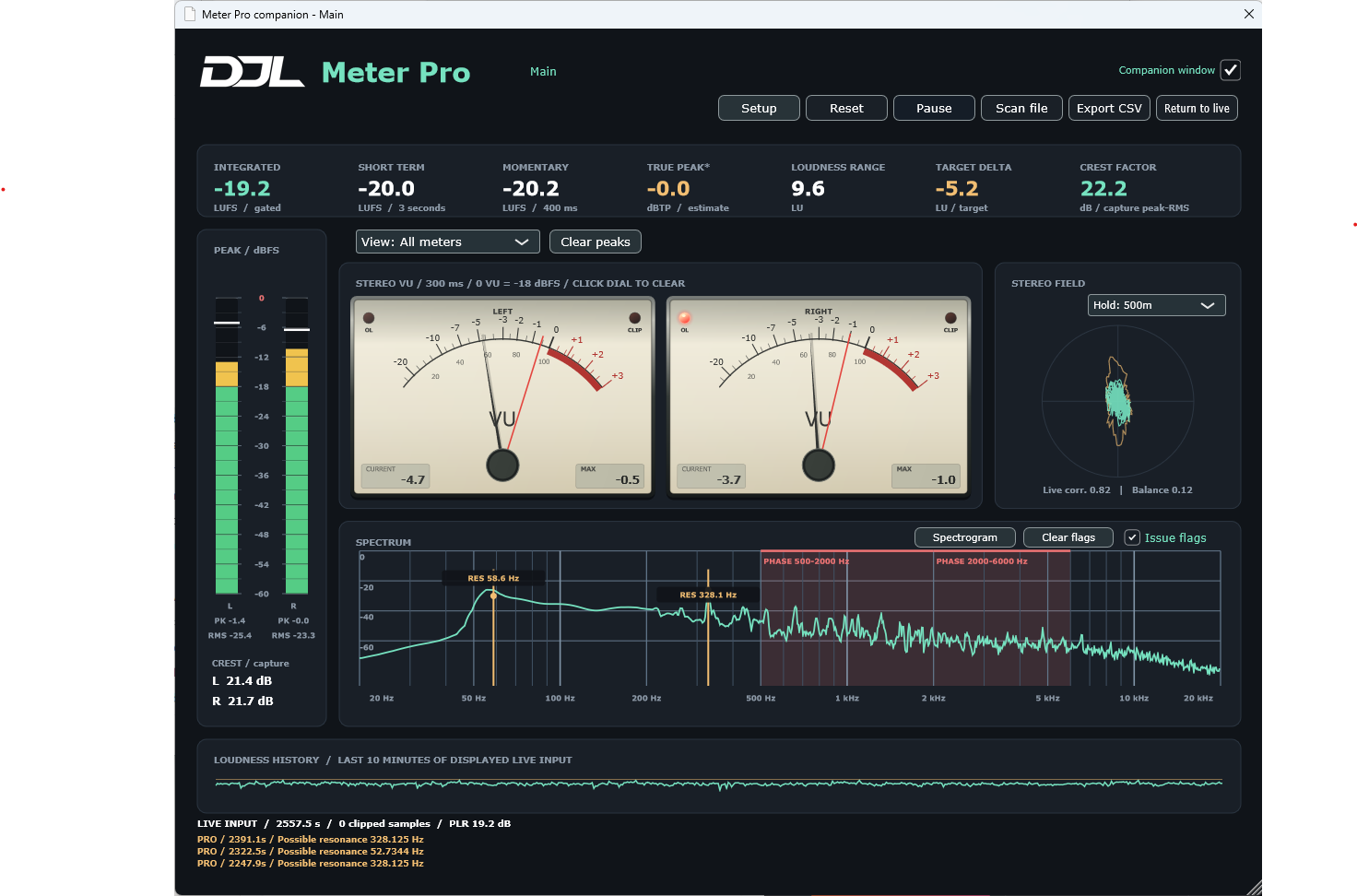
A closer look
Select a view to see the real interface. View selection is included in Meter and Meter Pro; Free uses a fixed layout.
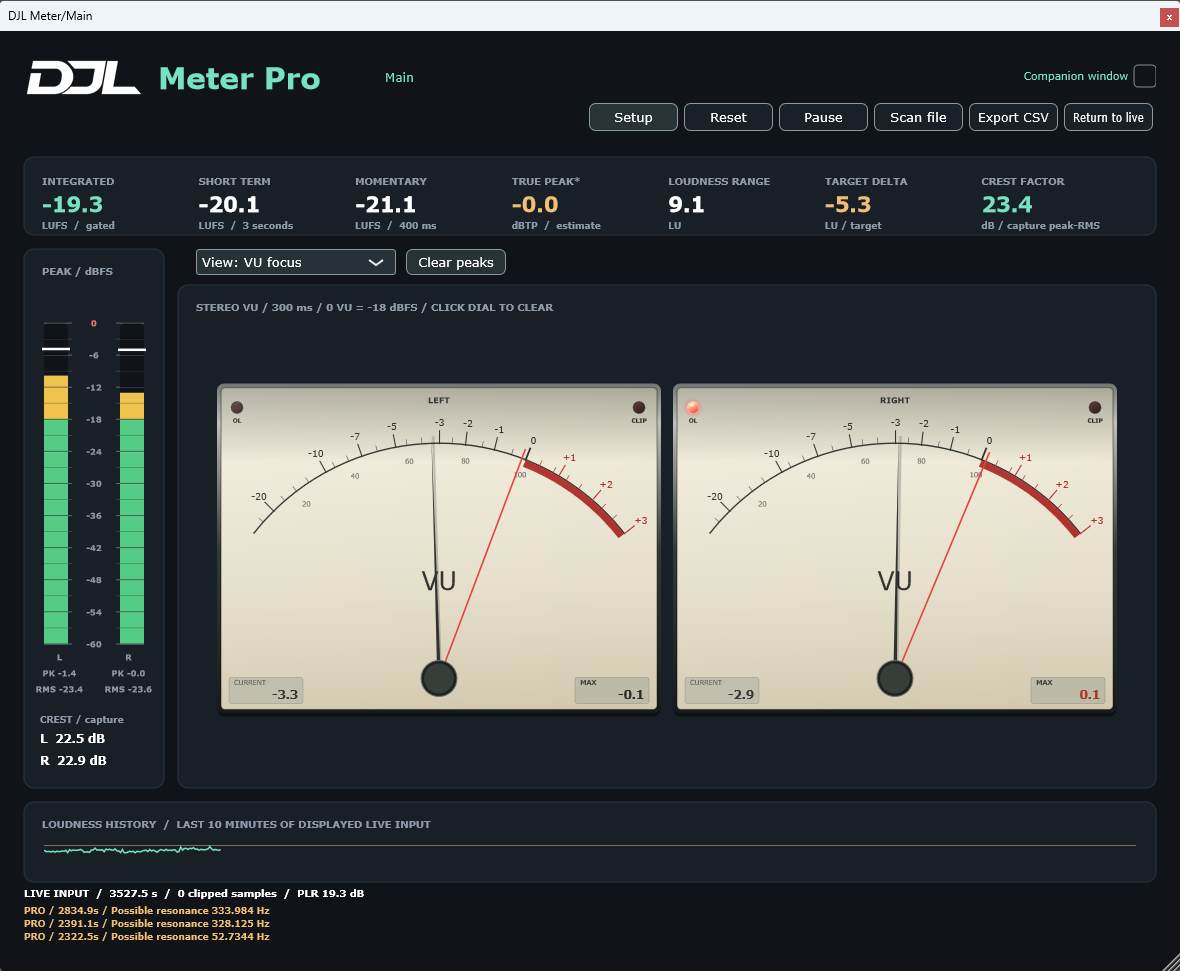
Meter Pro / detection tools
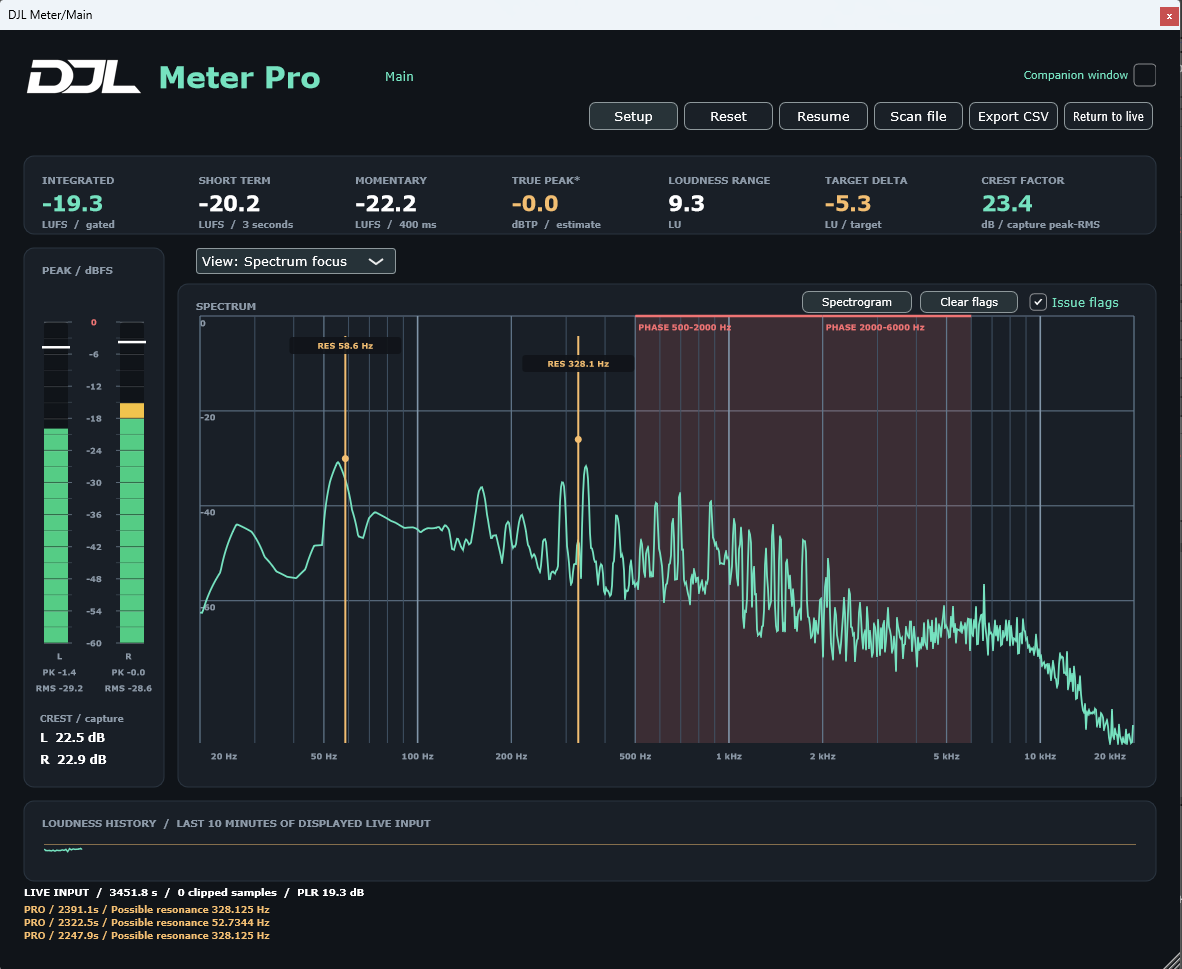
Check negative correlation and possible mono cancellation by frequency band. Spot persistent narrow peaks that may need closer attention.
Red PHASE bands and amber RES frequency markers stay on the spectrum until you clear them. The latest three messages stay in view, with more detail in Pro detection.
Warnings are prompts to investigate. Sustained musical notes can be flagged too; Meter detects candidates and leaves the decision to you.
See what is in Pro →One installation / three editions
The same Windows app and plugin support all three editions. An edition licence unlocks the extra tools; upgrades do not require a different plugin.
01 / Free
Free
VU, peak, spectrum and stereo field in a fixed layout.
Download now02 / More insight
One-time purchase
Loudness, dynamics, correlation and a workspace you can focus.
Buy now03 / Deeper checks
One-time purchase
Phase and resonance checks, issue flags and a live spectrogram.
Buy now| Feature | Free | Meter | Pro |
|---|---|---|---|
| Stereo VU, peak markers and overload lights | Yes | Yes | Yes |
| Spectrum and stereo field | Yes | Yes | Yes |
| Selectable main view | — | Yes | Yes |
| Stereo correlation and persistence outline | — | Yes | Yes |
| Loudness, RMS, crest and true-peak estimate | — | Yes | Yes |
| PPM and K-system display modes | — | Yes | Yes |
| File scanning and CSV reports | — | Yes | Yes |
| Phase and mono-cancellation detection | — | — | Yes |
| Resonance detection and issue history | — | — | Yes |
| Persistent spectrum issue flags | — | — | Yes |
| 30-second live spectrogram | — | — | Yes |
| Choose your edition | Download now | Buy now | Buy now |
Version 1 is mono/stereo. Surround analysis is planned for a future paid major upgrade and is not included in the current editions.
Insert the VST3 on a track or the main bus. In standalone, select an audio input or scan an audio file with a paid edition.
Follow VU and peaks, inspect the spectrum, and check stereo placement. Paid editions add correlation, loudness and view selection.
Open the companion window to follow the attached track while working elsewhere in your DAW. Pro adds detection history and persistent issue flags.
Version 1.0.0 / Windows
Meter Free is available as a VST3 ZIP with installation instructions, or a standalone/VST3 installer. These downloads are unsigned while publisher signing is pending. Paid checkout is being connected.
One download supports all three editions. Free needs no key. Paid purchases will receive an emailed activation key for one named user and two active installations. Public activation and Shopify checkout are not live yet.
Tested in Ableton Live 12 on Windows, including 96 kHz playback through FlexASIO and synthetic phase faults. Automated mono/stereo measurement, plugin-validator and installer checks have passed. These checks do not certify every DAW, audio driver or real-time workload.
Meter’s mono/stereo measurement engine has been tested using the published EBU and ITU test sequences:
These are internal validation results against official test material, not EBU or ITU certification. Multichannel/surround measurement is outside this tested scope.
macOS, Android, iPad and iPhone versions are not currently available.
The plugin passes audio through unchanged. Its metering and analysis do not adjust gain or process your mix.
No. The VU dial follows sustained level with 300 ms ballistics. Peak markers catch faster transients. Paid editions also provide RMS and crest readings.
The standalone measures its selected audio input. It does not automatically capture every app or your DAW output. Use the VST3 inside your DAW, or an audio interface/loopback route that exposes the desired signal as an input.
Yes. The separate companion belongs to its Meter instance and continues showing that instance’s input. The DAW controls the behaviour of its own plugin editor windows.
It is a reference, normally −14 LUFS. Target delta compares measured integrated loudness with that value. Meter does not simulate a service’s codecs, limiting or normalization settings. True peak is displayed as an estimate.
One installation supports Free, Meter and Pro. A paid licence unlocks its edition. A paid licence covers one named user with up to two active installations. Buy now and the app Upgrade command lead to the same purchase page, then Shopify. Your unique activation key is emailed after payment is confirmed. Checkout is currently being connected.